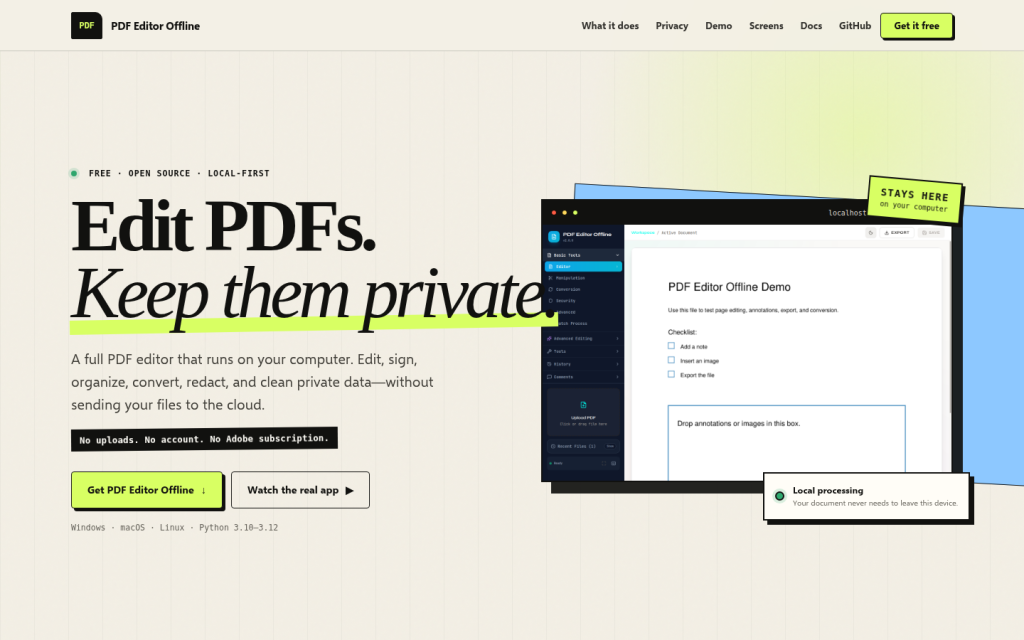
PDF Editor Offline is a free, open-source PDF editing and management tool focused on local, privacy-first workflows for individuals and organizations that want to work with PDF files entirely on their own devices or infrastructure. It provides a full-featured PDF workspace that runs on desktop systems and can also be deployed as a local web application, command-line utility, Python package, or Docker-based API service.
The core purpose of PDF Editor Offline is to let users edit, sign, organize, convert, redact, and clean PDF documents without sending them to external cloud services or requiring an online account. Documents are opened and processed locally, either in a desktop app or a browser-based interface that connects to a locally running backend. The tool is designed so that uploads, edits, and exports stay within a private session on the user’s machine or self-hosted server, forming a clear privacy boundary where files do not leave the environment controlled by the user.
As a PDF editor, the software supports a wide range of everyday document tasks. Users can add and modify text, insert images, draw shapes and freehand annotations, highlight content, attach comments and notes, place stamps and watermarks, and manage file attachments within a PDF. It includes form-filling capabilities for standard PDF forms and allows users to apply typed, drawn, image-based, or certificate-backed signatures, making it suitable for completing and signing contracts, agreements, and other formal documents.
For document organization, PDF Editor Offline enables merging multiple PDFs into a single file, splitting a document into separate parts, reordering and rotating pages, cropping and duplicating them, compressing files to reduce size, numbering pages, and removing blank pages. These features help visitors assemble new documents from existing materials, prepare files for distribution, or simplify large PDFs into more manageable versions.
The tool also offers extensive conversion functions, allowing users to move content between PDF and other formats such as Word, PowerPoint, Excel, images, Markdown, plain text, EPUB, SVG, and archival-friendly PDF/A. This makes it useful both for extracting information from PDFs into reusable formats and for turning other document types into standardized PDF output for sharing and storage.
Privacy and data hygiene are central themes of the project. PDF Editor Offline includes tools to inspect and remove metadata, attachments, links, annotations, form data, and other hidden or embedded details that might carry sensitive information. Users can review what is stored in a document and then clean private data before sharing a file. For particularly sensitive documents, it offers permanent text redaction workflows. Visitors can search for specific content, mark it for removal, create a separate redacted copy while preserving the original source, and then verify that the redacted version no longer contains the targeted information. Verification reports describe which checks were run, what passed or failed, and what could not be evaluated.
Beyond manual editing, the project supports additional technical capabilities for more specialized use cases. It includes local optical character recognition (OCR) functions to make scanned documents searchable, PDF protection tools to manage access and security features, and accessibility inspection to evaluate documents against accessibility considerations. For automation and integration into larger systems, PDF Editor Offline exposes a command-line interface, a Python API, and FastAPI-based endpoints, enabling batch processing, scripted operations, and custom workflows that operate entirely within the user’s environment.
Visitors can interact with the project in several ways. There are desktop preview builds for Windows, macOS, and Linux, which can be downloaded and run locally. The site notes that these desktop downloads are currently unsigned, and system security prompts may appear, but the project advises keeping operating system protections enabled when running the preview. Alternatively, users can clone the public repository and run the full local web application from source using Python, or they can install the Python package via common package management commands. A Docker image is also available for running the API and editor on self-hosted infrastructure.
For exploration and testing, the website provides an animated product demo that shows a synthetic PDF being opened, searched, redacted, exported, and rechecked within a private, loopback-only session. It also offers several safe sample PDFs that demonstrate basic editing and exports, redaction workflows, and privacy-focused cleanup tasks, allowing visitors to try the tool without using their own confidential documents. The public Trust Lab highlights which PDF engines and features have been tested, along with areas where support remains limited, giving users insight into the project’s coverage and reliability without exposing document content.
The software is released under the MIT open-source license, and the source code is hosted in a public repository that invites inspection and contribution. Developers and self-hosters can start the visual editor locally, install the command-line tools, or integrate the Python and FastAPI layers into their own projects. Typical use cases include editing and signing business documents, cleaning and redacting legal or financial PDFs before external sharing, converting archives into more accessible formats, centralizing PDF workflows on internal servers, and building automated document-processing pipelines that never send files to third-party services.
Overall, PDF Editor Offline serves as a comprehensive, privacy-focused PDF toolkit for users who prefer or are required to keep document processing under their own control, combining an accessible visual editor with automation and integration options suitable for both individual and professional environments.
Key features
- Local-first PDF editor that processes documents entirely on the user’s device or chosen host, without cloud uploads or remote storage.
- Rich editing and annotation tools for adding and modifying text, images, drawings, highlights, comments, stamps, watermarks, and attachments within PDFs.
- Form filling and signing capabilities, including typed, drawn, image-based, and certificate-backed signatures for standard PDF forms.
- Page organization features such as merging, splitting, reordering, rotating, cropping, duplicating, compressing, numbering, and removing blank pages.
- File conversion between PDF and formats like Word, PowerPoint, Excel, images, Markdown, text, EPUB, SVG, and PDF/A.
- Privacy tools to inspect and remove metadata, attachments, links, annotations, form data, and other hidden content from documents.
- Permanent text redaction workflows that create a separate redacted copy, preserve the original source, and verify that sensitive content has been removed.
- Local OCR for making scanned PDFs searchable, plus PDF protection and accessibility inspection features.
- Command-line interface, Python API, and FastAPI endpoints for automation, batch processing, and integration into other applications.
- Desktop preview builds for Windows, macOS, and Linux, along with options to run a local web app from source and a Docker image for self-hosting.
- Public Trust Lab and documentation that describe tested PDF engines, supported features, limitations, and safe sample PDFs for evaluation.
Who it is for
- Individuals who need to edit, sign, convert, and organize PDF documents on their own computers without relying on cloud services.
- Professionals handling sensitive or confidential documents, such as legal, financial, medical, or compliance-related files, who require local processing and robust redaction and privacy tools.
- IT teams and organizations that want to self-host PDF workflows on internal infrastructure or integrate PDF processing into existing systems via APIs and automation.
- Developers seeking an open-source, Python-friendly PDF toolkit with a visual editor, command-line tools, and FastAPI endpoints for custom document-processing pipelines.
- Privacy-focused users who prefer tools that operate offline, do not require accounts, and avoid telemetry or hidden uploads when working with PDFs.
Access and pricing
PDF Editor Offline is presented as a free, open-source tool released under the MIT license. There is no mention of paid subscriptions, tiered pricing, or mandatory purchase requirements in the available documentation.