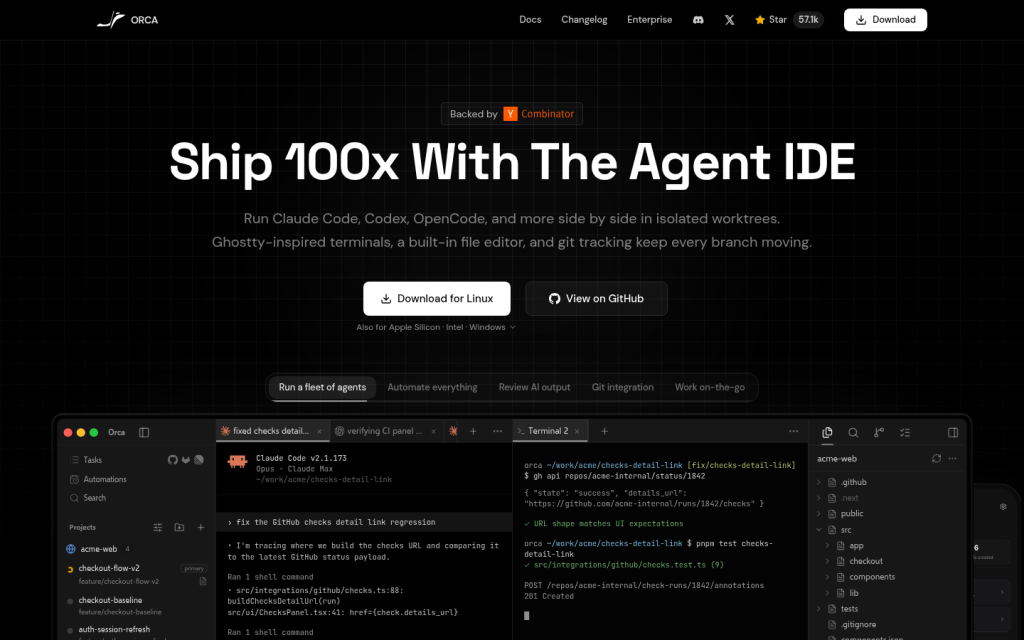
Orca is an agent development environment for working with coding agents in parallel. It is designed for users who want to run multiple agent CLIs side by side in isolated worktrees while managing git state, terminals, files, browser interactions, and review tasks in one workspace. Public materials describe it as a desktop application with a companion mobile app, supporting agent-driven workflows such as delegating tasks, reviewing AI output, coordinating branches, and tracking progress across repositories. The resource is aimed at developers and builders who use coding agents such as Claude Code, Codex, OpenCode, Grok, Gemini, Cursor CLI, and similar tools, and it is presented as compatible with users’ existing subscriptions rather than as a model itself. Orca is distributed as free, open source software under the MIT License, with desktop builds for macOS, Windows, and Linux, plus mobile options for iOS and Android. Visitors can find downloads, documentation, source code, changelog information, and product details about features such as terminal splits, built-in file editing, design mode, diff annotation, GitHub and Linear integration, SSH worktrees, native search, and account usage tracking. The access model is open source and download-based, and the gathered sources do not verify a paid subscription requirement for the core product.
Key features
- Parallel agent execution in isolated git worktrees
- Desktop app for macOS, Windows, and Linux
- Mobile companion app for iOS and Android
- Built-in terminals, file editor, browser, and git tracking
- Support for multiple coding agent CLIs
- Account usage tracking and switching
- Design mode and diff annotation workflows
- GitHub and Linear integration
- SSH worktrees and remote-agent support
- Native search across worktrees, files, agents, and commands
Who it is for
- Software developers
- AI-assisted programmers
- Builders using coding agents
- Teams coordinating multiple agent workflows
- Users who want desktop and mobile control over agent-driven development
Access and pricing
The core software is described in public materials as free and open source under the MIT License. Desktop builds are offered for download, and no verified paid pricing structure was established in the gathered sources.