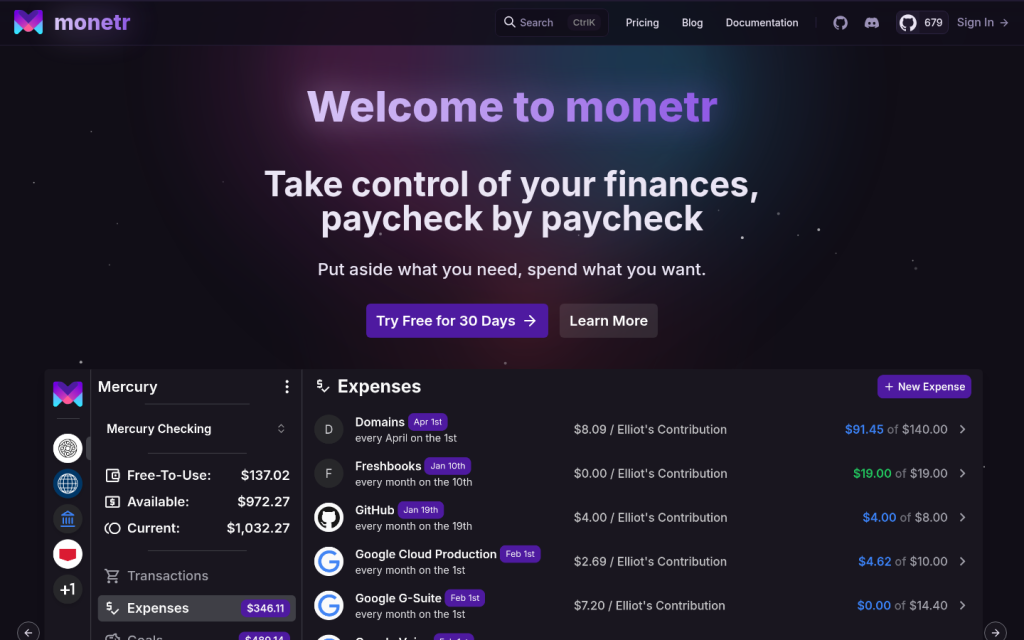
monetr is an online personal finance and budgeting application designed to help individuals manage their money on a paycheck-by-paycheck basis, with a strong focus on planning for recurring expenses and understanding how much is genuinely safe to spend. The service is available as a hosted web application at monetr.app and also as a self-hosted, open-source platform that users can deploy on their own infrastructure. Its core aim is to make budgeting around bills, subscriptions, and savings goals clearer by automatically setting aside the amounts needed for future obligations and showing a remaining balance that reflects only discretionary funds.
Visitors to monetr.app find a web-based budgeting tool that works across desktop and mobile browsers and can be installed as a progressive web app for a more app-like experience. After creating an account, users typically start by linking one or more bank accounts using a third-party integration such as Plaid, or by importing transaction files manually from their bank. The application can receive automated updates of transactions and balances when connected through Plaid, so users can periodically log in to categorize transactions, assign them to budgets, and review their finances without manually re-entering every operation. For those who prefer not to use automated connections, monetr supports manual transaction uploads using OFX or similar files and manual entry of individual transactions.
A central concept in monetr is the funding schedule, which represents when the user gets paid or when funds become available. Users define funding schedules to match their income patterns, such as weekly, biweekly, monthly, or other intervals. Each expense or savings goal is tied to a funding schedule, allowing the application to allocate appropriate amounts from each paycheck toward that item. This structure enables budgeting beyond the traditional monthly view and helps users with non-monthly income or irregular pay cycles plan effectively. By allocating funds at each pay event, the application maintains predictable and consistent Free-To-Use funds.
Expenses and goals in monetr represent specific budgets for recurring bills, subscriptions, regular obligations, or savings objectives. Users can create expenses for items such as rent, utilities, insurance, or streaming services and define their recurrence pattern, amount, and associated funding schedule. Goals operate similarly but focus on saving toward a target, such as building an emergency fund, saving for a trip, or accumulating money for a large purchase. When transactions are imported or synced from bank accounts, monetr maps each transaction directly to an expense or goal budget rather than only broad categories. Users can reassign transactions if needed, ensuring that each payment or deposit is matched with the relevant budget item.
The Free-To-Use feature is a calculation that shows how much money is available for discretionary spending after accounting for funds allocated to expenses and goals. monetr determines the available balance and subtracts the total allocations for required payments and savings, presenting a single figure that represents the amount the user can spend without jeopardizing future obligations. This helps visitors who use the service understand, at a glance, what portion of their account balance is truly safe to spend. The system also supports transferring funds between expenses, goals, and the Free-To-Use balance, giving users flexibility to adjust allocations when priorities change.
Forecasting tools in monetr allow users to see a forward-looking view of their finances based on current budgets, funding schedules, and planned expenses or contributions. Within the application, forecasting appears on pages for expenses, goals, and funding schedules and can show upcoming contribution or spending events alongside current allocations. This timeline-style view helps users anticipate when bills will be paid, how savings will grow, and how their Free-To-Use balance will evolve over time. By visualizing the financial future, monetr supports planning decisions and gives users greater confidence about upcoming months.
The application is designed to be mobile friendly, with interfaces for viewing transactions, budgets, funding schedules, and forecasts on smaller screens. Because monetr is built as a web application, users can access the same account from multiple devices, and they can install it as a web app on desktops or mobile devices for quicker access. This approach allows the service to function similarly to native budgeting apps while remaining accessible through standard browsers.
monetr offers a commercial hosted version with a subscription-based pricing model. New users can typically sign up for a free trial period, stated as 30 days in current documentation, which allows them to explore the service without providing a payment method. During the trial, there may be limits on the number of bank connections that can be made through Plaid, intended to reduce misuse while still supporting legitimate evaluation of the product. After the trial, access to the hosted application continues through a paid monthly subscription. The pricing page and billing documentation explain the billing cycle, subscription structure, and any applicable constraints, though the exact subscription amounts are not restated here.
In addition to the hosted service, monetr is fully open source and can be self-hosted at no software licensing cost. The source code is publicly available, and documentation describes installation steps, including options to deploy via Docker Compose or other container-based setups. Self-hosting allows individuals or organizations to run monetr on their own hardware, manage their own data storage, and control integration with financial data providers. This model is of particular interest to users who value data privacy, prefer to avoid third-party hosting, or enjoy customizing open-source software. External self-hosting catalogs and app store listings for platforms such as home server or personal cloud environments also describe monetr as a budgeting application focused on recurring expenses and safe-to-spend calculations.
The monetr site provides several types of content to support users and prospective visitors. A documentation section explains how to use key features, such as creating funding schedules, managing expenses and goals, handling transactions, using Free-To-Use, configuring forecasting, and understanding billing. This documentation often includes step-by-step guidance and conceptual explanations, which help users learn the workflow for setting up their budgets and maintaining them over time. A blog section includes posts introducing monetr, explaining its background and design philosophy, and announcing important milestones such as its public launch. The pricing page outlines subscription terms and the free trial, while other informational pages describe features and capabilities.
Typical use cases for monetr include personal budgeting to ensure recurring bills are covered, planning savings for medium- to long-term goals, tracking discretionary spending while protecting funds needed for obligations, and gaining a clearer picture of upcoming financial events. Users might employ the application to handle multiple funding schedules when they have more than one source of income, to organize transactions from several bank accounts, or to combine expense tracking with goal-based savings. For self-hosted deployments, monetr can be part of a broader suite of self-managed personal finance tools on platforms that support running apps at home.
The primary intended audience for monetr consists of individuals who want a structured, forward-looking approach to personal budgeting, including those with recurring expenses, regular paychecks, and savings goals. It also caters to technically inclined users and self-hosting enthusiasts who prefer open-source, self-deployable finance software. Access to the hosted version is through a user registration process that requires creating an account, after which users can configure bank connections, budgets, and goals. Access to the self-hosted version depends on users deploying the software themselves and then registering accounts within their own instance.
Overall, monetr is positioned as a focused personal finance application that helps users take control of their finances by allocating funds paycheck by paycheck, planning for recurring expenses, tracking goals, and clearly identifying what is safe to spend. Its combination of hosted and self-hosted options, open-source codebase, and detailed documentation make it a resource for visitors seeking a budgeting tool that emphasizes recurring obligations, transparent allocations, and forward-looking financial planning.
Key features
- Paycheck-based budgeting that allocates funds from each pay event to recurring expenses and savings goals.
- Support for recurring expenses on various intervals, not limited to a single monthly budget structure.
- Savings goals management, allowing users to create and track goals with contributions tied to funding schedules.
- Free-To-Use balance calculation showing how much money is truly available for discretionary spending after allocations.
- Bank connectivity using Plaid for automated transaction and balance updates from supported financial institutions.
- Manual transaction import via OFX or similar bank files and manual entry of individual transactions.
- Forecasting tools that show future allocations, contributions, and spending events for expenses and goals.
- Funding schedules representing income timing, used to determine when and how much to allocate to each budget item.
- Direct mapping of transactions to specific budgets, such as particular expenses or goals, instead of only broad categories.
- Web-based interface that is mobile friendly and installable as a progressive web app on desktop or mobile devices.
- Hosted cloud service with a subscription model and a 30-day free trial without requiring a payment method.
- Open-source codebase with documentation and a free self-hosting option, including container-based installation guides.
- Documentation covering concepts like Free-To-Use, funding schedules, transactions, forecasting, and billing.
- Blog content introducing the app, explaining its design, and announcing public launch and updates.
Who it is for
- Individuals seeking a structured, paycheck-based budgeting tool to manage recurring expenses and discretionary spending.
- People who want to plan for bills, subscriptions, and savings goals using forward-looking financial forecasts.
- Users who prefer clear visibility into safe-to-spend balances after accounting for required payments and goals.
- Technically inclined individuals and self-hosting enthusiasts looking for an open-source personal finance application they can run on their own servers.
- Visitors interested in web-based personal budgeting tools that work across desktop and mobile devices.
Access and pricing
monetr offers a hosted version with a subscription-based pricing model and a 30-day free trial period during which no payment method is required. During the trial, the service limits users to a single Plaid bank connection to reduce spam while still allowing evaluation. After the trial, subscriptions are billed monthly, with exact prices and any applicable tiers or regional differences described on the pricing and billing documentation pages of the site. The software is also available as a completely free self-hosted open-source application, with no license fee for running it on personal or organizational infrastructure.