
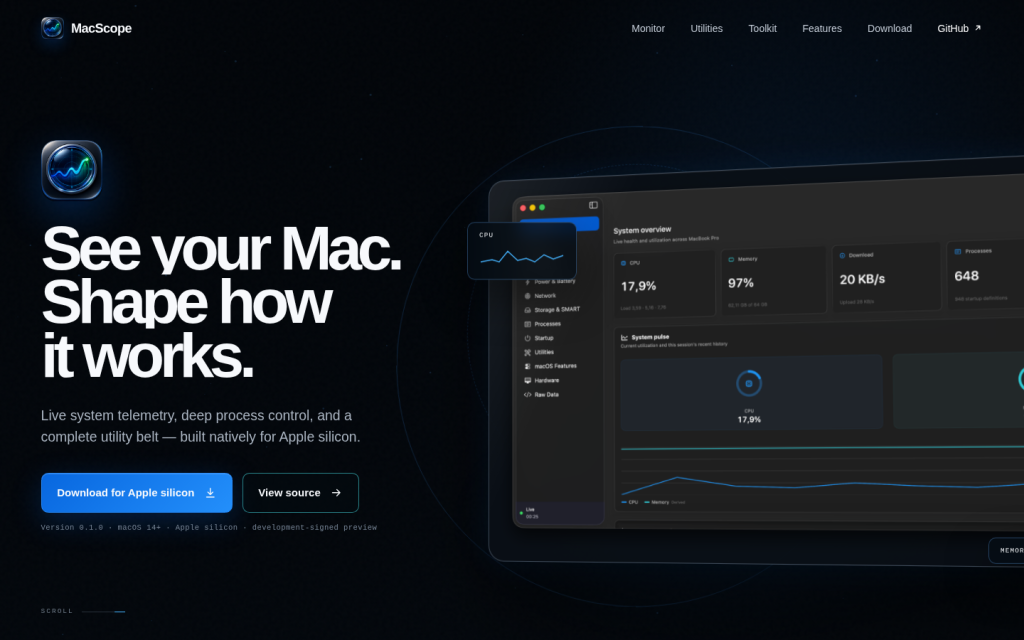
MacScope is a native macOS application that combines system monitoring, process management, and a broad toolkit of everyday utilities for Apple silicon Macs running macOS 14 or later. It is presented as a single command center where visitors can download a preview build and use it to observe, control, and customize how their Mac behaves, with an emphasis on local processing and explicit permissions.
At its core, MacScope functions as a detailed system monitor and process manager. Visitors who install the app can view live telemetry for their current Mac, including CPU and memory usage, disk and network activity, thermal information, and a complete list of running processes. The monitoring interface is described as a high-density workspace that aims to surface the signal without unnecessary noise, allowing users to watch multiple system metrics in one view. The app offers process control tools that help users spot, sort, inspect, and act on processes safely, coupled with local history and tiered snapshots that keep context close when diagnosing issues or reviewing past activity.
Beyond monitoring, MacScope provides a set of utilities designed to support day-to-day work and system maintenance without requiring users to switch between many separate apps. These utilities cover sound handling, screen and media capture, window and input management, clipboard and file tools, notes, maintenance operations, and power and display management. Each capability is organized into modules or workspaces that can be installed or removed individually, allowing the user to keep the interface uncluttered while ensuring that audio controls and live disk activity remain easily accessible.
The Sound workspace focuses on audio routing and control. It enables switching between inputs and outputs, routing audio from individual applications, adjusting per-app volume beyond the usual 0–100 percent range, muting microphones, pinning particular inputs, and protecting volume after headphones disconnect. This module is aimed at visitors who need fine-grained audio management for multi-app setups, recording, or focused listening.
The Capture and media workspace offers tools for taking and working with visual content from the Mac. It supports timed captures, window-only captures, selection-based captures, and scrolling captures. Users can record displays or windows, edit captured content locally, run optical character recognition (OCR) and QR code actions on captured material, pick colors from the screen, and preview the camera. These capabilities make the app useful for documentation, tutorials, visual design work, and any workflow that relies on repeated screen captures and recordings.
The Windows and input workspace is designed to help users arrange and navigate application windows more efficiently. It includes tools for arranging windows into halves, thirds, corners, and across multiple displays, snapping windows to screen edges, switching directly to an exact window rather than cycling blindly, dragging windows from anywhere rather than relying solely on title bars, and tuning mouse and keyboard behavior. Visitors interested in window management and keyboard-driven workflows can use these tools to shape how their Mac workspace is laid out across one or more monitors.
Clipboard and file tools are grouped into another workspace. This module provides search across an opt-in clipboard history, snippet expansion, automatic stripping of tracking information from links, pasting as plain text, adding shortcuts into the Finder, and a shelf for temporarily parking files to move later. These features target users who work heavily with text and files and want to streamline repetitive copy-paste and file handling tasks.
The Notes workspace offers named Markdown scratchpads that remain close at hand, with focused tabs for different contexts. It includes automatic clearing of sensitive working notes after a quiet period, supporting workflows where temporary notes, draft content, and sensitive snippets need to be kept available briefly but not stored indefinitely.
The Maintain workspace provides a set of maintenance utilities. Within this area, users can review applications and leftover files before sending them to the Trash, locate large downloads and caches that consume disk space, manage Homebrew and application updates, and perform basic media transformations such as image conversion or video editing. These tools help visitors keep their systems tidy and up to date while staying inside the MacScope environment.
The Power and displays workspace gives control over how the Mac and its screens stay awake and present content. Users can keep the Mac or display awake on demand or according to rules, adjust brightness on supported hardware, apply reversible software-based dimming, and lock input to safely clean the keyboard or trackpad. This makes the app relevant for situations where continuous display or controlled sleep behavior is important, such as presentations, monitoring tasks, or extended work sessions.
MacScope also includes a catalog of macOS controls that are not typically visible in standard settings panels. The app exposes more than two hundred hidden or advanced controls, grouped with clear safety states and exact-value undo. Users can inspect live values, preview changes, and revert actions precisely, and they can find deeper system settings without manually hunting through multiple panels. Certain actions are marked as protected, requiring confirmation before they run, which is intended to reduce the risk of unintended changes.
To reach its tools, MacScope offers several interaction modes. Users can invoke a command bar, a quick panel, a radial launcher, global shortcuts, and a local MCP server, giving multiple ways to access the same capabilities depending on their preferred workflow. The app is described as fast, private, and fully native to Apple silicon, with no invented telemetry and a default preference for local operations.
Visitors to the site can download MacScope as a development-signed preview for macOS 14 and later on Apple silicon. The website provides instructions to open the downloaded disk image, drag the app to the Applications folder, and launch it with an initial control-click and Open action while the preview remains non-notarized. A documentation section is referenced where users can read more about the app’s features and operational details.
Overall, MacScope is presented as a comprehensive system intelligence and utility toolkit for Apple silicon Macs, combining monitoring, control, and productivity-focused utilities in one modular application. It is aimed at power users, developers, and anyone who wants deeper insight into their Mac’s behavior while having quick access to common tasks like capture, window handling, clipboard management, notes, maintenance, and power management within a single, locally focused tool.
Key features
- Native Apple-silicon system monitor and process manager for macOS 14 and later.
- Live telemetry across CPU, memory, disk, network, thermals, and running processes.
- Process control tools for spotting, sorting, inspecting, and acting on processes with local history snapshots.
- Modular toolkit with seven main workspaces: Sound, Capture and media, Windows and input, Clipboard and files, Notes, Maintain, and Power and displays.
- Advanced audio routing and per-app volume control, including volume protection and microphone muting.
- Screen capture and recording capabilities, including timed, window, selection, and scrolling captures, local editing, OCR, QR actions, color picking, and camera preview.
- Window management functions for grid-based layouts, snapping, multi-display arrangement, precise window switching, and input behavior tuning.
- Clipboard history search, snippet expansion, link tracking removal, plain-text pasting, Finder shortcuts, and file shelf for deferred moves.
- Markdown-based scratchpad notes with tabs and automatic clearing of sensitive notes after idle periods.
- Maintenance tools for reviewing apps and remnants before deletion, locating large downloads and caches, managing Homebrew and app updates, and performing image conversion or video editing.
- Power and display management tools to keep the Mac or displays awake by rule or on demand, adjust hardware brightness, apply software dimming, and lock input for cleaning.
- Catalog of more than 200 hidden or advanced macOS controls with live value inspection, change previews, exact-value undo, and protected actions.
- Multiple access modes including command bar, quick panel, radial launcher, global shortcuts, and local MCP server.
- Emphasis on local operation, explicit permissions, and non-invented telemetry.
- Development-signed preview distribution via downloadable DMG for Apple silicon Macs.
Who it is for
- Mac power users who want combined system monitoring and utility tools for daily work.
- Developers and technical users who need detailed insight into Apple silicon system behavior and processes.
- Professionals who rely on advanced screen capture, recording, and window management on macOS.
- Users who manage multi-monitor setups and require fine-grained audio, display, and power control.
- Visitors who prioritize local processing and explicit permissions for system tools on macOS.